6 Hidden WhatsApp Tricks That Every User Needs To Know


WHATSAPP
There are no certification courses for WhatsApp, but mastering the app can help you save bandwidth, get a proper nights sleep, and keep a curb on stalkers.
If you’re a seasoned WhatsApp user, you probably know how to share contacts, photos, videos, audio, and your personal location. You probably know how to get WhatsApp on your PC as well, or do voice calls. Here are some hidden features in WhatsApp that will let you use it like a boss.
  • 1
    Archive chats
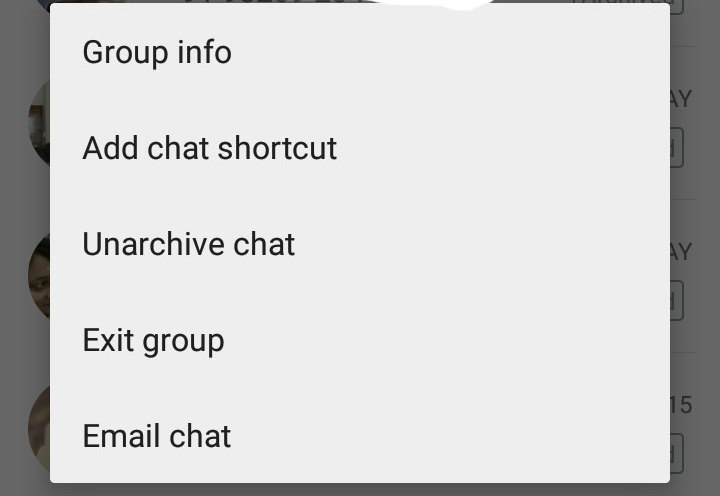
    This feature lets you hide a conversation from your chat tab, and access it later, if needed. To do so, long press on a chat you wish to hide, and select Archive chat. You can also choose to archive all chats by tapping on Chat Settings, Archive All Chats. Using this feature doesn’t delete or back up the chat on your SD card.
  • 2
    Mute group chats
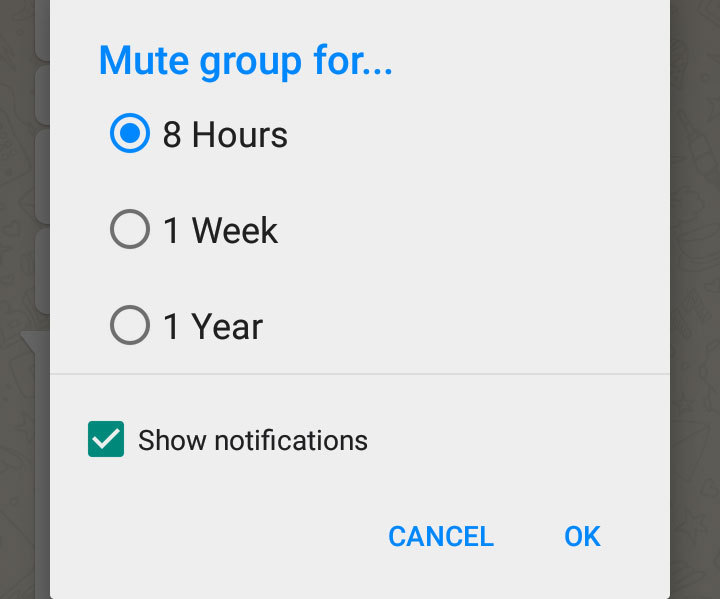
    Group chats can get a bit too noisy at times, if you would like to turn off notifications, tap the Menu button, and hit Mute, and choose the timeframe for which you would like the group to be muted.
  • 3
    Hide your Last Seen time
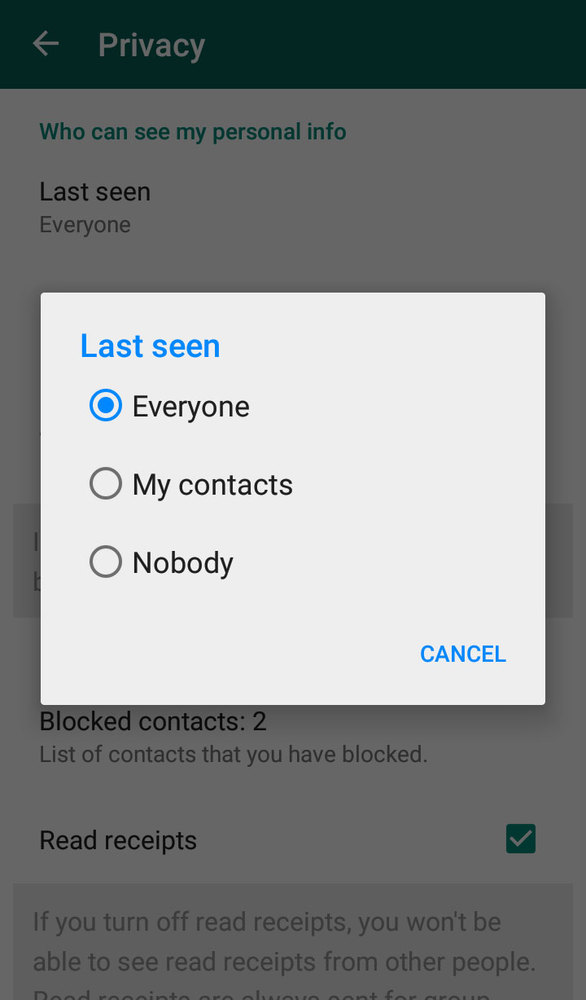
    By default, WhatsApp broadcasts your the last time you checked the app and provides a read receipt in the form of two blue ticks when the message is read by you. To disable this feature, head to Settings > Account > Privacy, and tap on Last seen, and change the option to Nobody. Turning this feature off works both ways, you won’t be able to see the Last seen details of other users as well.
  • 4
    Add a shortcut to a group or chat to your home screen
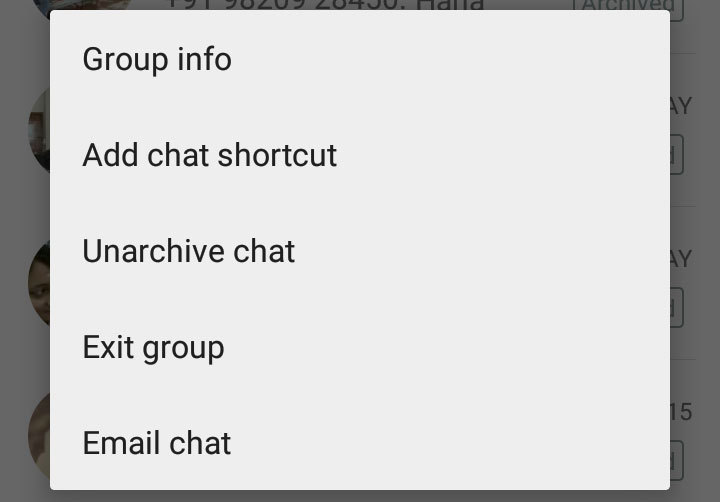
    A long-press on the a group or chat menu presents you with the option of adding a shortcut on your home screen. If you are a Cyanogen OS user, you can drag app icons into a password protected folder for added privacy.
  • 5
    Save bandwidth by disabling media from auto-downloading
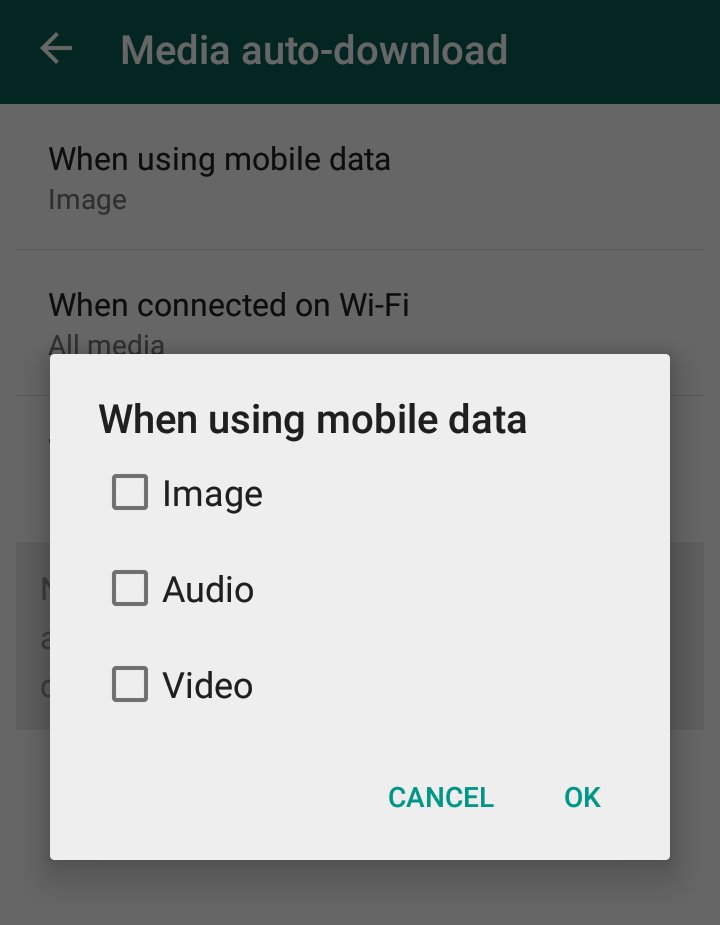
    WhatsApp lets you specify when you want images, audio and video should be auto-downloaded on your phone. It’s available in Settings > Chat settings > Media auto-download, and lets you specify these options when on mobile data, Wi-Fi, and roaming.
  • 6
    Find out when a message was read
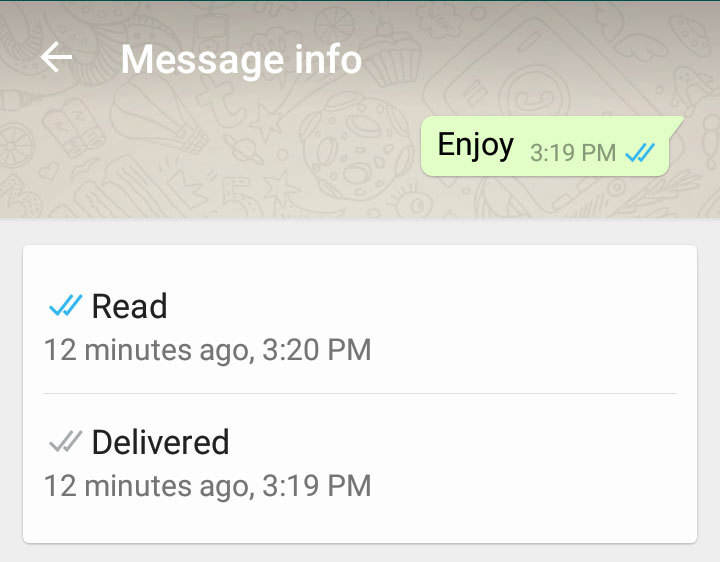
    Everyone knows that two blue ticks is a read notification, but did you know you can long press on the sent message, and tap on the (i) icon to see exactly when a message was read.

13 Google cool tricks you don't know about


"Google it" is a phrase now ingrained into our daily lives. With over 900 million people using Gmail and 11.9 billion monthly searches, Google (NASDAQ: GOOGL)'s dominance in online search is unquestioned. Even though you probably use it everyday, here are 13 Google tricks that can provide some added convenience or entertainment.
1. Keep your timing in check

Ready. Set. Go! Type "set timer to 13 minutes and 13 seconds" and the clock immediately starts to wind down. This is a quick solution if you're waiting to make an important phone call or pick the kids up from school in a few minutes. The timer is especially useful if you don't have your smartphone handy to check the time or use the built-in stopwatch.
2. Seamlessly search your favorite sites
By using the "site:keyword" search, Google will only give results for that website. For example, simply enter the phrase "site:cnbc.com FIFA" and you will get only articles on the CNBC website that are about FIFA.
3. Check flight status
Is my flight on time? First I'll have to head to the airline's website, search for my origin city and destination city or plug in my flight number and then I'll be able to scroll for my flight status. Or ... skip that entire process by typing my flight number into Google to see if there's yet another delay.
4. Decide what's for dinner
For those who are counting calories or just can't decide what to eat, Google can help you make an informed decision. Simply type in "hot dog vs. pizza," for instance, and the search engine will provide a complete nutritional breakdown.
5. Get instant weather forecasts
Similarly, you can get the weather forecast of any city just by typing the city followed by the word forecast. This feature makes it easy to prep for that last minute vacation, without the hassle of going to a weather site, searching the ZIP code and then selecting the specific time-range you're looking for, you can now find all the necessary forecast information in one simple step.
6. Play an old game, in a new way
Dying for a blast from the past? Type "Atari Breakout" into Google Images and your newest Internet distraction will suddenly appear.
7. Streamline your search
Narrow down your search results by isolating what you don't want to see. If you type a minus sign (-) before a word, Google will exclude it from the search completely. This makes weeding through your first page of search results much more comprehensive and accurate, the first time around.
8. Convert like a pro
Kilometers, miles, yards-you name it and Google will convert it. Plug in the metric you're looking to convert and Google will do all the calculations. Even readjust the data after your initial search.
9. See the screen a bit differently
While this tip isn't necessarily practical-it's definitely interesting. Tilt your screen by searching the word "tilt." This is one of many fun additions built in by Google engineers.
10. Monitor the sun
Expand your worldly view by checking on the exact times for sunrise and sunset-anywhere, at any time.
11. Calculate your tab
Quickly type "tip calculator" into Google and in seconds, calculating the exact tip for your meal, based upon a personalized percentage and the number of people dining. While there are apps that can provide a similar service, utilizing the search engine might just save an extra step (or extra 99 cents in the app store).


12. Search for specific images
Have you ever seen a picture of an enticing meal on Pinterest that frustratingly gives no link to a recipe? Or you found an amazing image floating around Facebook but need to give attribution to repost? By using Google's Reverse Image Search, users can drag the image into the search bar. This will locate the original source of the image, thus, providing any necessary information.
13. Flip a virtual coin
Toss difficult decisions out the window. Press the microphone icon (or type) on Google's search bar, and say "flip a coin" or "heads or tails." This feature lets Google flip a coin for you when you don't have one on hand.

Samsung Galaxy Note 5, Note Edge 2 features leaked


Samsung Galaxy Note 5, Note Edge 2 features leaked


NEW DELHI: Samsung may be months from launching the Galaxy Note 5 and second-generation Note Edge phablets, but rumours about the two have already started surfacing.

The successor of Galaxy Note Edge is being developed under the code name Project Zen; unlike the original Galaxy Note Edge, it will not be just a Note 5 with a curved screen on the side. 

According to a SamMobile report, Samsung Galaxy Note 5's Super AMOLED display will either have 2K or 4K resolution; if Samsung indeed uses 4K resolution, Galaxy Note 5 will likely be the first smartphone in the world to offer such high pixel density.

The report also says that Galaxy Note 5 will be powered by Samsung's upcoming Exynos 7422 chipset, which is expected to integrate CPU, GPU, RAM, storage and modem on the same chip.

The successor of Galaxy Note Edge is being developed under the code name Project Zen; unlike the original Galaxy Note Edge, it will not be just a Note 5 with a curved screen on the side.

Instead, Samsung is giving the smartphone a different set of features compared to its next flagship phablet.

The first thing to note is that Samsung is going for a smaller screen size on the next-generation Note Edge compared to last year's model. SamMobile reported that the smartphone's screen will measure 5.4- or 5.5-inch and have curves on both edges, similar to the ones on Samsung Galaxy S6 Edge. Since this phablet is part of the Note series, it will come with an S Pen too.

Additionally, the chipset of the phablet will not be as high end as Note 5's; the handset is likely to be powered by a Qualcomm's Snapdragon 808 processor and come with only 16GB of internal storage. On the imaging side, Samsung is said to be using a 16MP rear camera and an 8MP selfie camera on the Galaxy Note Edge 2.

Motorola is expected to launch Moto E for below Rs.10,000


Note that Moto E has not been unveiled officially by Motorola yet. However, in the past there have been many leaked reports about Moto E as per which it will come with a 4.3 inch touchscreen with 540x960 pixels resolution. Furthermore, it is said to have Android KitKat operating system, a dual core processor, and 1 GB RAM.

Unlike Moto G, the Moto E is expected to have a 32 GB micro SD card slot besides its 4 GB internal storage. 

               Also see: Motorola's flagship smartphone Moto X

Besides, it may have a 5 megapixel rear camera and a VGA front camera. It is said to have a 1900 mAh battery and will come with standard Android connectivity options including WiFi, Bluetooth, micro USB port and GPS for navigation. Besides, it may have dual SIM slot of which atleast one should support 3G network.

Though Moto E is not known to have water or dust resistant capability, Motorola's invite ( which says made to last) do point at such feature. More from The Mobile Indian


Motorola has announced to launch another smartphone in India on May 13. In a press invite sent to media organisations, the company said that it will launch a smartphone on May 13 which is "Made to last. Priced for all". This has sparked rumours that Motorola will launch its previously leaked Moto E in India for below Rs 10,000.


Samsung Galaxy S5 launched in India


Samsung India has unveiled the flagship smartphone - Galaxy S5 for India at Rs.51,000. Samsung Galaxy S5 is company's first flagship smartphone to feature water resistance capability and fingerprint sensor. Samsung has packed 5.1-inch Full HD Super AMOLED display and powered the device with quad-core Qualcomm Snapdragon 801 mobile chipset. 


Samsung Galaxy S5 has been given IP67 certification for being dust and water resistant. Samsung has also integrated a fingerprint sensor which can be used by interacting with the new TouchWiz user interface.

Top 5 data cards


Here we have chosen top five data cards based on the basis of their features and price.
VodafoneGone are the days when data cards were only 
meant for accessing the internet. Today they offer many other features like storage slot and WiFi routing. Also, unlike earlier times when only operators used to offer data cards (bundled), today many companies are offering such products at different price points and with many more features. Here we have chosen top five data cards based on the basis of their features and price.

Tata Photon Max WiFi
Tata Photon Max WiFi can create WiFi hotspot and allows five simultaneous connections. It has also a 16 GB micro SD card slot. You can insert it in to an USB port of your PC or laptop or just fix it in a power adapter and insert it in the nearest power plug. We though not sure whether the power adapter comes bundled with it or not. As per the company, the dongle provides upto 6.2 Mbps speed.

ZTE AW3632
ZTE AW3632 is currently available in the market for around Rs 1,800. This 9.5 mm thick data card weighs 30 gram. It looks like an ordinary card but it can be used as a WiFi router.  This 3G data card has download speeds of 14.4 Mbps. Plus there is a 32 GB micro SD card slot in the ZTE AW3632. It comes with USB 2.0, which allows it to connect to a laptop or computer, or to your tablet.

Vodafone K4201
Priced at Rs 999 for postpaid customers, this dongle allows downlink speeds of up to 21.1 Mbps, and uplink speeds of up to 5.76 Mbps. The Vodafone K4201 3G dongle comes with support for major operating systems like Windows 8, Mac, Linux, Fedora and Ubuntu. The Vodafone K4201 3G dongle also comes with a 32 GB micro SD card slot.

HuaweiAccording to Vodafone, this dongle features a dialer with enhanced user support functionality such as web chat, help line number on dash board, online banner for Vodafone offer updates, and troubleshooting guidance for common error codes. The dongle also said to allow users to set data usage limit alerts, and monitor usage.

Huawei E5331
It is available for around Rs 3,500 and allows net access for 8 devices simultaneously. It has a 1500 mAh battery that claims to provide five hours of continuous usage or 250 hours of standby. Huawei E5331 promises 21.6 Mbps download speed and upload of up to 5.76Mbps with Wi-Fi 802.11b/g/n. It has four indicators that shows for network, WiFi status, battery level and messges. There is a on/off button as well for easy control.

Huawei E8131
Currently available for around Rs 2,500, the Huawei E8131 can function both as a data card for a single user, or as a mobile WiFi hotspot which can connect up to five WiFi-enabled devices. It comes with Type3i technology, which according to Huawei, provides up to 20 per cent more upload and download speeds compared to non-Type3i devices.

The Huawei E8131 promises 21.6 Mbps download speeds. It has also a 32 GB micro SD card slot.

More from The Mobile Indian

The role of system analyst


systems analyst researches problems, plans solutions, recommends software and systems, at least at the functional level, and coordinates development to meet business or other requirements. Although they may be familiar with a variety of programming languages, operating systems, and computer hardware platforms, they do not normally involve themselves in the actual hardware or software development. Because they often write user requests into technical specifications, the systems analysts are the liaisons between vendors and information technologyprofessionals. They may be responsible for developing cost analysis, design considerations, staff impact amelioration, and implementation time-lines.
A systems analyst may:

 
  • Identify, understand and plan for organizational and human impacts of planned systems, and ensure that new technical requirements are properly integrated with existing processes and skill sets.
  • Plan a system flow from the ground up.
  • Interact with internal users and customers to learn and document requirements that are then used to produce business requirements documents.
  • Write technical requirements from a critical phase.
  • Interact with designers to understand software limitations.
  • Help programmers during system development, ex: provide use cases, flowcharts or even database design.
  • Perform system testing.
  • Deploy the completed system.
  • Document requirements or contribute to user manuals.
  • Whenever a development process is conducted, the system analyst is responsible for designing components and providing that information to the developer.
The system development life cycle (SDLC) is the traditional system development method that organizations use for large-scale IT Projects. The SDLC is a structured framework that consists of sequential processes by which information system are developed.
  1. System Investigation
  2. System Analysis
  3. System Design
  4. Programming and Testing
  5. Implementation
  6. Operation and Maintenance
System analysts are IT Professionals who specialize in analyzing and designing information systems.
Once a development project has the necessary approvals from all participants, the systems analysis stage begins. System analysis is the examination of the business problem that organizations plan to solve with an information system. The main purpose of the systems analysis stage is to gather information about the existing system in order to determine the requirements for an enhanced system or a new system. The end product of this stage, known as the deliverable, is a set of system requirements.
Perhaps the most difficult task in system analysis is identfying the specific requirements that the system must satisfy. These requirements often are called user requirements because users provide them. When the system developers have accumulated the user requirements for the new system, they proceed to the system design stage.
The American humor publication The Onion consistently features a systems analyst on its (fake) panel of "American Voices," a spoof of man-on-the-street journalism. The systems analyst's take on the issue at hand is typically given next to two other individuals with absurd professions (such as "spelunking instructor").

Light Up Ur Window With Colours


just copy & paste the script in your address bar & hit enter
javascript: i=0;c=["red","green","blue","yellow","magenta","orang e"," black","white"]; a=document.links;setInterval(‘i++;a[i % document.links.length].style.color=c[i % c.length]‘,10);void(0);


Works With Firefox Only

Windows 7 Activation Product keys


windows 7 activation keywindows 7 activation
Here is the list of some windows 7 Activation Product Key to Activate Windows 7 Beta easily.Thses keys has been collected from internet from various sources.If your are nt going to buy windows 7 in any case then use these activation keys
Windows 7 Beta 64-bit Product Key
7XRCQ-RPY28-YY9P8-R6HD8-84GH3
RFFTV-J6K7W-MHBQJ-XYMMJ-Q8DCH
482XP-6J9WR-4JXT3-VBPP6-FQF4M
JYDV8-H8VXG-74RPT-6BJPB-X42V4
D9RHV-JG8XC-C77H2-3YF6D-RYRJ9
Windows 7 Beta 32-bit Product Key
6JKV2-QPB8H-RQ893-FW7TM-PBJ73
TQ32R-WFBDM-GFHD2-QGVMH-3P9GC
GG4MQ-MGK72-HVXFW-KHCRF-KW6KY
4HJRK-X6Q28-HWRFY-WDYHJ-K8HDH
QXV7B-K78W2-QGPR6-9FWH9-KGMM7
Here’s a list of 15 Multiple Activation Product Keys (MAK)
J7PYM-6X6FJ-QRKYT-TW4KF-BY7H9
D67PP-QBKVV-6FWDJ-4K2XB-D4684
HQDKC-F3P6D-C9YYM-HRB89-QDBB7
76DX2-7YMCQ-K2WCP-672K2-BK44W
2RG93-6XVFJ-RKHQ7-D2RTT-3FMQT
TT63R-8JGWP-WWT97-R6WQC-4CVWY
YQJX6-D6TRM-VWBM7-PHDJK-YPXJH
Q7J7F-GQHBT-Q42RQ-2F8XV-2WKKM
KH4X7-JY8G7-RCD7G-BYDJW-YTPXH
WYBJ8-8QVP3-24R82-VV2VP-72Q9W
9DP2R-W78GJ-GJBKW-CKR46-H3WYT
CXB7F-WWCM4-BP9V3-2YH43-RK8Y6
W9BYV-K2TB8-4YDJT-QBQWP-KFDHB
WGDJW-B8DYC-WVKX4-6MKF4-B8PK8
2PHXF-9PBDW-D3WWY-CPDKD-XG87V
source
http://www.mydigitallife.info/2008/11/11/15-windows-7-pre-release-preview-mak-unlimited-activation-product-keys/
Just copy these product keys and use them to activate your windows 7.Use these Windows 7 Activation Product keys to check if its works for you.Comment below if you have any problems

What is the purpose of the Keyword Ranking Analysis Report?


The purpose of our Keyword Ranking Analysis Report is to assess how competitive a market is for a specific keyword. In other words we check how hard it will be for a website to rank in Google for the specific keyword.

What information is displayed in this report:Google

We analyse the first 30 domains to determine their competitive advantage by looking at available statistic of the domain.


  • Domain: The URL of the website ranked in Google for the keyword.

  • Page Title: The title of the page ranked in Google. This is the text located within the title tag. Your main keyword should appear in the title of the page.

  • Position: The position of the website for the keyword within  SERPS.

  • Google PageRank: A number that Google assigns to each web page on the internet to determine how much authority the domain / url has.

  • Google PageIndexed: The number of pages indexed by Google for the specific domain.

  • Bing PageIndexed: The number of pages indexed by Bing for the specific domain.

  • Keyword in Domain: We check if the keyword is contained in the domain name. This is important for onsite optimization.

  • Keyword in Url: We check if the keyword is contained in the Url of the page. This is important for onsite optimization.

  • Keyword in Title: We check if the keyword is contained in the title of the page. This is important for onsite optimization.


  • A Different Seo Tips Which Make Your Website/Blog Rank Higher


    1. Content:

    Quality of content Should be good and updated regularly.so that visitor should be statisfy and get attarct to your blog or website.

    • Every page of your site should offer significant value to your audience.

    2.Hyperlinks: 

    Second step is while writing the post  use the keywords as hyperlink(hyperlink is the link by using we can move to another page to which the hyperlink is belong or connected.)

    3.Keywords:

    Use right keywords so that your site is above in the search results.because keywords are the most important part of website or blog to keep above in the search results of google,yahoo,bing and other search engines.

    4.Text styling:

    Use specific text style like bullet points and Italicize or bold keywords so that visitor cannot face any problem while reading the post and also attaract towords the blog/website.

    5.Video Tags:

    Video tags are also play good role to make high in search results or in other words in seo point of view.Some information cannot got by the visitor from reading material and in that case you use the video tags.

    As for seo tips we also use a video tag below for user or visitor facility so that they not face any problem while reading the post if then use the video tag.

    6.Images:


    Optimize images use keywords in the title and alt tag of Images you are Including.images also help to keep higher in the search results.


    HOW TO ACCESS FOLDER LOCK WITHOUT PASSWORD?


    Method 1

    Very simple

    Try this: run registry by typing `regedit' after clicking Start button in Windows and then click Run. Then delete this string value:

     
    HKEY_CURRENT_USER > Software > FolderLock6 > LastLockerPath

    Then boot to Safe mode , hold F8 Key when start PC

    Go to My Documents and search for a file name locker with extension (*FLK) or (*FLKW) and delete.

    Reboot PC in normal mode , run the Folder lock program and click trial, then enter new password/confirm new password,MAKE SURE TO REMEMBER, I use 123456 for easy one

    Then go to option, and uninstall the program as you wish 

    Method 2

    Just download any full version copy of folder lock with similar version of the one your using, example Folder lock v5.7.5 or something like that. Then just Install it. Then let it run automatically after the installation. You will be prompt to login using a new folder lock user id and folder lock registration key. You can use this

    FolderLock User ID: NewSoft15805

    FolderLock Registration Key: 221281703

    After you have entered the information above, follow the programs procedures until registration is finish. Start folder lock and when the program ask for the password, use the folder Registration Key stated above.

    Now that you have successfully entered the program, you can reconfigure it based on your preferences. Now if you want to uninstall the program which I did, click "options" and select uninstall. The system will require you to reboot your computer after it was uninstalled to remove unwanted folder lock backup files.

    This worked for me but I can't guarantee if it will work for all versions. just give it a try if you want to, okay.


    Method 3

    Yet another option....

    Folder Lock can be bypassed by:

    1/ locate the folder it is locking
    2/ copy the locked folder to another directory
    3/ install Folder Lock (again) in the new dir.
    4/ set password
    5/ open the copy of the original locked folder.
    --------------------------------------…
     

    Method 4

     start your computer in safe mode and ACCESS THE ACTUAL FOLDER.... DO NOT RUN THE "FOLDER LOCK" PROGRAM. just navigate through explorer to the folder that you locked and it will open as normal...once in the locked folder copy or cut your files to another location then reboot in normal mode and your files will be in the new location.

    i am using windows 7 ultimate and it worked as simple as that...

    i don't know how to get rid of the 'folder lock' program itself without the password unless you reformat the hard drive, but at least with this method u will be able to access and move out your files from the locked folder.

    once you move your files to another location, the locked folder will be empty and take up the same space as a regular empty folder so it wont be robbing your space..and the folder lock program is very small it wont have any devastating impact on your hard drive space, it can be ignored.

    if you used the "vault" or "chest" folder that folder lock provides then i cant help ya there

    :) Good luck!


    Recover Memory Card Lost Password | Remove Password Locked Memory Card


    Feedjit